Start with plain-language guidance for decision makers: what each service helps you achieve, what to expect, and how to take the next step.
Expand the architecture, security controls, implementation scope, and detailed reference guidance on this page. Your planner choices and inquiry stay in place.
SECURE OPEN SOLUTIONS
See how the protection fits together.
Explore how access checks, protected workspaces and security monitoring support a defined working environment. Expand the reference diagrams when you want the technical view.
What to discuss with SOS
Understand who can access sensitive work
See where information travels and stays
Explore the checks that support ongoing protection
Inspect the control layers and follow the CUI workflow.
SECURITY ARCHITECTURE / INTERACTIVE
Seven controls. One coherent boundary.
Explore how identity, network, data, endpoints, detection, and cloud applications work together in a GCC High enclave. Select a numbered control to inspect its architecture.
01 / IDENTITY & ACCESS
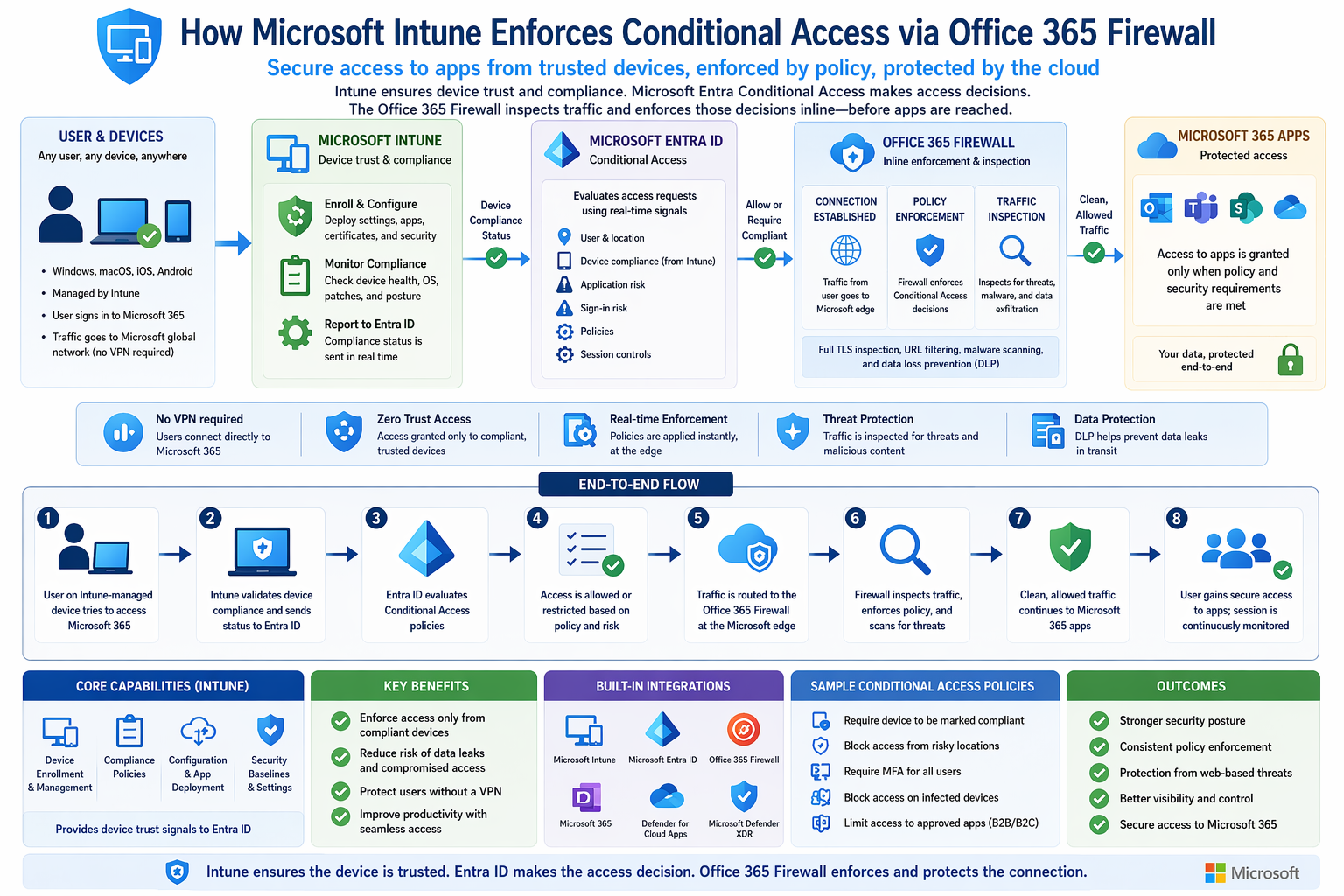
Device trust before access
Intune manages device configuration and reports compliance signals to Microsoft Entra ID. Conditional Access uses those signals with identity, location, and sign-in risk to decide whether users may reach approved cloud resources. Policies are designed around each user and CUI workflow.
Use Enlarge diagram to inspect the image, or select the diagram to discuss it ↗
GCC HIGH / AZURE GOVERNMENT ENCLAVE
Follow the CUI. Inspect the controls.
See how a virtual desktop keeps CUI processing inside the enclave, how GCC High collaboration fits alongside Azure Government, and how security telemetry supports continuous compliance.
CUI WORKSPACE / BOUNDARIES + FLOWS
See where the data goes. See what protects it.
Swipe across the map to inspect each boundary, or use the numbered steps below.
Four paths, one logical boundary.
Purple is identity policy; blue is the remote session; teal is approved CUI collaboration; amber is telemetry and evidence. The outer frame groups the CUI workspace logically. Azure Government and GCC High retain separate service boundaries.
1 / Verify identity
Entra ID, MFA and Conditional Access evaluate the user and access conditions. Managed-device compliance and untrusted-device access are separate policy decisions.
2 / Open an isolated session
Windows App reaches the AVD service. Session hosts initiate outbound service connectivity. Only display and input are intended at the access device; configured redirection restrictions protect the CUI workspace.
3 / Process and collaborate
CUI is processed on multi-session or dedicated hosts and exchanged with approved SharePoint, OneDrive, Exchange and Teams workflows. Network egress, labels, DLP and sharing policies serve different purposes.
4 / Keep evidence current
Review identity, host, application and configuration signals against controls. Validate findings, track POA&M actions and refresh SSP/authorization evidence; telemetry does not automatically establish compliance.
Moving packets illustrate flows, not live traffic.
OPTIONAL HYBRID EXTENSION / VARIANT 3
A controlled handoff into an isolated asset boundary.
Approved cloud workflowManaged transfer station / CUI VLANApproved media + custody checksIsolated OT / specialized asset
Define transfer direction, authorized operator, media protection, inspection, custody and evidence before allowing the handoff. Confirm what the asset can read. If encrypted media is incompatible, validate an appropriate protection approach for the actual workflow. The extension does not create unrestricted connectivity from AVD to equipment.
Logical reference architecture, not a physical topology, certification or promise of control inheritance. Validate government-cloud service availability, licensing, endpoints, session controls and customer/provider responsibilities for the implementation. This view illustrates a relayed AVD session; other approved transport configurations require their own validation.

 Use Enlarge diagram to inspect the image, or select the diagram to discuss it ↗